A technology solutions professional helps businesses identify technology problems and select suitable solutions. The role combines technical knowledge, business analysis, planning and communication to ensure technology supports organizational goals.
Professionals may work with IT infrastructure, cloud platforms, data storage, cybersecurity software integration and enterprise systems. Their responsibilities depend on the employer, industry, project requirements and experience level.
Understanding this career helps beginners explore the required skills, qualifications, certifications and career opportunities. It also helps businesses understand how technology professionals support better decisions and solve operational challenges.
What Is a Technology Solutions Professional?

A technology solutions professional evaluates business needs and recommends, designs, implements or improves technology systems. The objective is to solve practical problems while considering cost, security, compatibility, performance and future requirements.
For example, a company experiencing slow access to its files may need better storage, network improvements or changes to existing applications. A professional investigates the cause before recommending an appropriate solution.
The job title covers different types of work. Some professionals specialize in technical design, while others focus on consulting, implementation, product knowledge or enterprise technology planning.
Technology Solutions Professional Role and Responsibilities
The technology solutions professional role connects business requirements with technical decisions. Professionals gather information, assess existing systems, compare available options and help plan appropriate solutions.
Common technology solutions professional responsibilities include requirements analysis solution design, technology evaluation, system integration, implementation planning, testing and performance optimization.
They may also document technical decisions, explain risks to business teams, coordinate project activities and help users understand new systems. Some positions include ongoing technical support after implementation.
Technology Solutions Professional Skills and Qualifications
Technology solutions professionals need technical knowledge, analytical thinking, communication and project coordination skills. The specific requirements depend on whether the position focuses on cloud infrastructure, enterprise architecture, storage, networking or cybersecurity.
Employers may consider education, practical experience, certifications and completed projects when evaluating candidates. There is no single qualification required for every position with this job title.
What Skills Does a Technology Solutions Professional Need?
Technical analysis: Professionals must understand how systems work and identify the causes of technical problems. This involves reviewing infrastructure software dependencies, data flows and system limitations.
Problem solving: A suitable solution addresses the underlying problem rather than just its symptoms. Professionals compare alternatives and evaluate their likely benefits, costs and risks.
Communication: They need to explain technical information to people with different levels of expertise. Clear documentation helps stakeholders understand recommendations and implementation requirements.
Project coordination: Technology changes often involve multiple teams. Organizing tasks, managing dependencies, tracking progress and communicating updates helps keep projects on schedule.
Security awareness: Professionals should consider access controls, data protection, backups, network security and applicable compliance requirements when designing solutions.
What Qualifications Are Required?
A degree in information technology, computer science, information systems or a related field can provide a useful foundation. However, education requirements vary according to the employer and position.
Practical knowledge is also important. Experience with operating systems, networking, databases, cloud platforms, storage systems or software integration can help candidates demonstrate their abilities.
Beginners can develop their skills through technical courses, guided labs, personal projects, internships and IT support roles. Advanced positions may require experience designing complex systems or managing enterprise implementations.
Technology Consulting Services and Business Solutions
Technology consulting services help organizations understand technical challenges and decide how to address them. A technology solutions consultant may review existing systems, evaluate requirements, compare options and develop a practical technology roadmap.
Consulting projects can focus on a single issue, such as improving data access or a larger program involving infrastructure, security and digital transformation. Defining the project scope helps everyone understand the expected outcomes.
How Do Technology Solutions Professionals Solve Business Problems?
Professionals begin by identifying the business problem and its impact. Slow access to company files, for example, might result from network congestion, limited storage capacity, outdated equipment or an inefficient application.
They investigate the issue using available evidence, such as system logs, performance measurements, infrastructure reviews and user feedback. This helps prevent unnecessary spending on solutions that do not address the actual cause.
After identifying possible options, professionals compare cost, compatibility, security, scalability and maintenance requirements. They then help implement the selected solution and evaluate whether it achieves the intended results.
Technology Solutions Professional vs. IT Consultant
A technology solutions professional often focuses on evaluating, designing, recommending or implementing technical solutions. An IT consultant commonly advises organizations on technology decisions, systems, processes and operational improvements.
These roles can overlap significantly. Some IT consultants design and implement systems, while some technology solutions professionals concentrate mainly on recommendations and technical planning.
The distinction depends on the employer. When comparing job opportunities, review the actual responsibilities, technical requirements, decision making authority and expected project outcomes rather than relying only on the job title.
Enterprise Technology Solutions and Architecture
Enterprise technology solutions address the needs of an organization across multiple systems, departments or business functions. They may include applications, cloud services, IT infrastructure, data management, networking and cybersecurity.
These components must work together effectively. A change to one platform can affect connected applications, data access, security controls, support requirements and future upgrades.
What Is Enterprise Architecture in Technology?
Enterprise architecture describes how an organization’s business processes, information, applications and technology infrastructure relate to one another. It helps decision makers understand existing systems and plan technology changes around business objectives.
Professionals use architecture models to document dependencies, identify duplication and assess proposed changes. This is particularly useful when an organization operates many interconnected systems.
System architecture visualization uses diagrams and models to show how applications, infrastructure and data sources connect. These visuals help technical teams understand complex environments and explain proposed changes to business stakeholders.
For visualization to remain useful, its information must be accurate and current. Outdated diagrams can create incorrect assumptions so teams should update them when important systems or dependencies change.
How Are Enterprise Technology Solutions Designed?
Solution design begins with requirements analysis. Professionals identify business needs, existing systems, technical limitations, security requirements and the outcomes a proposed solution must achieve.
They compare possible designs and consider compatibility, scalability, reliability and budget. The resulting plan may include architecture diagrams, integration requirements, implementation stages and testing procedures.
Where practical, a limited deployment or controlled test can reveal problems before a wider rollout. This allows teams to evaluate the design and make necessary adjustments before committing more resources.
Technology Implementation and Integration

Technology implementation turns an approved design into a working system. Activities may include configuring infrastructure, installing software, migrating data, setting permissions and testing the environment.
Technology implementation and integration are closely connected. Integration allows different systems to exchange information and operate together, such as when a customer management platform connects with accounting software.
Professionals must consider data formats, authentication, access controls, error handling and system dependencies. Testing is essential because an integration that works initially may still require monitoring and maintenance after deployment.
How Do Professionals Improve Existing Systems?
Improvement starts with understanding the system’s current performance and limitations. Professionals may review response times, error reports, resource usage, security settings, maintenance history and user feedback.
They then identify changes that could provide meaningful benefits. These might include configuration adjustments, capacity upgrades software updates, workflow improvements or replacing an unsuitable component.
Testing and monitoring help confirm whether the changes deliver the expected results. If problems remain, additional investigation may be needed before further changes are made.
Choosing the Right Business Technology Solutions
Selecting technology should begin with the business problem rather than a particular product. A solution that works for one organization may not suit another because of differences in budget, infrastructure, security requirements and technical expertise.
A structured evaluation helps businesses compare options and avoid unnecessary spending. It also reduces the risk of choosing systems that cannot integrate with existing tools or support future requirements.
A Practical Technology Selection Process
Step 1: Define the requirements. Identify the problem, affected users, essential features, expected outcomes and technical limitations. Separate necessary requirements from optional improvements.
Step 2: Review existing systems. Assess current infrastructure, applications, networks, storage and integrations. Understanding what already works can prevent unnecessary replacements.
Step 3: Compare suitable options. Evaluate functionality, security, compatibility, scalability, support and maintenance. Consider whether the organization has the skills needed to manage the solution.
Step 4: Estimate the total cost. Include implementation, data migration, training, maintenance, support, upgrades and potential downtime—not just the initial purchase price.
Step 5: Test before deployment. Where practical, use a pilot or controlled test to check compatibility and performance under realistic conditions.
Step 6: Review the results. Establish implementation responsibilities, testing criteria and performance measures. After deployment, compare the results with the original business objectives.
Solutions for Different Business Sizes
Small businesses may prioritize affordable systems that are straightforward to manage. Cloud based services can reduce the need to maintain some infrastructure, depending on the organization’s requirements.
Medium sized businesses may need stronger integration, centralized administration, reliable backups and systems that support growth. Larger enterprises often have more complex applications, multiple locations, extensive data and additional governance requirements.
These are general patterns rather than fixed rules. The right solution depends on the organization’s actual needs, risk level, available resources and existing systems.
Security, Scalability and Technology Optimization
Security, scalability and compatibility are essential when evaluating technology solutions. A system may meet current needs but still be unsuitable if it exposes sensitive information or cannot support expected growth.
Network and security solutions may include access controls, encryption, monitoring, backups and recovery planning. The appropriate measures depend on the type of data, system purpose and organizational risks.
Scalability describes a system’s ability to accommodate changing workloads. Compatibility determines whether it can work with existing software, hardware, interfaces and operating environments.
Technology solution optimization involves reviewing performance and making appropriate improvements. Professionals may investigate slow applications, limited capacity, integration failures or outdated configurations before deciding whether an upgrade is necessary.
Technology Solutions Professional Certification
Professional certifications can demonstrate knowledge of particular technologies or technical disciplines. Their value depends on the certification’s scope, the employer’s expectations and the candidate’s ability to apply the knowledge.
Certifications may focus on cloud infrastructure, storage, networking, security, enterprise architecture or a specific technology provider. Candidates should verify current requirements through the official certification provider.
What Is the NetApp Certified Technology Solutions Professional Certification?
The NetApp Certified Technology Solutions Professional certification covers NetApp technologies, hybrid cloud concepts, storage software and intelligent data infrastructure.
This certification is most directly relevant to people learning about or working with NetApp technologies. It should not be treated as a universal qualification for every technology solutions position.
What Topics Are Covered in the NetApp Certification Exam?
NetApp lists three exam domains: infrastructure, data storage software and intelligent data infrastructure. Its published weighting assigns 25% to infrastructure, 37% to data storage software and 38% to intelligent data infrastructure.
The listed subject areas include infrastructure fundamentals, data management, virtualization, AI concepts, storage software, cyber resiliency, data mobility and hybrid cloud data protection. Candidates should review the official exam page for current information before preparing.
How Much Experience Is Needed for NetApp Certification?
NetApp recommends 3–6 months of experience with basic hybrid cloud functions for this certification. This is certification specific guidance, not a universal experience requirement for technology solutions professionals.
Candidates should check the latest official certification requirements and recommended learning resources before scheduling an exam.
Technology Solutions Career Path
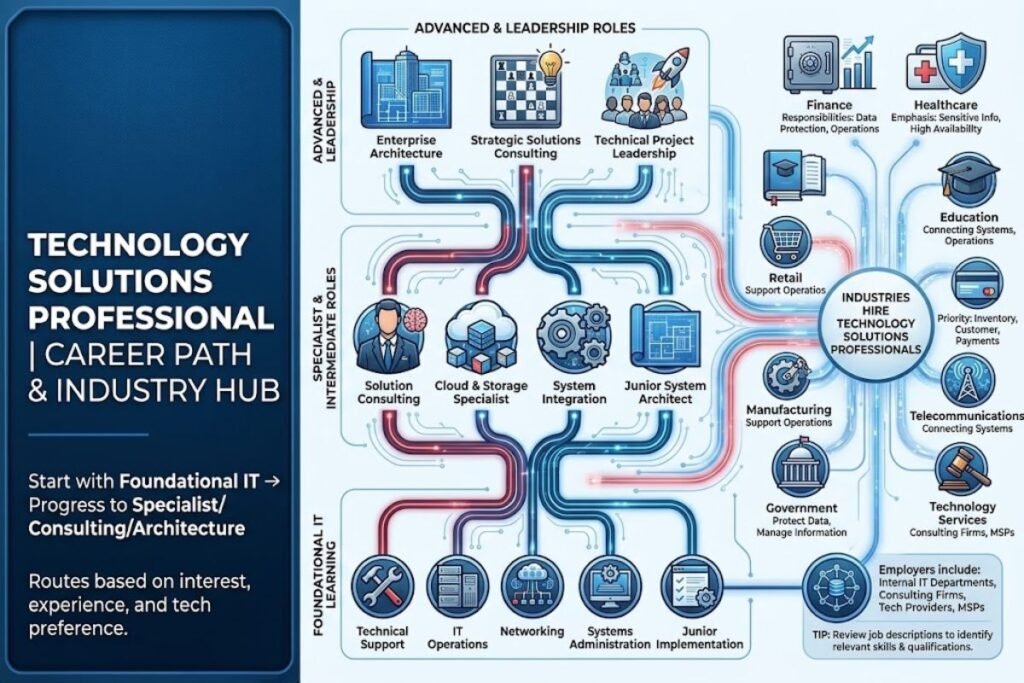
A technology solutions career path can begin with foundational IT learning and progress toward specialist, consulting or architecture roles. The best route depends on personal interests, practical experience and the technologies a candidate wants to work with.
Beginners may start in technical support, IT operations, networking, systems administration or junior implementation roles. These positions help develop troubleshooting skills and an understanding of business technology environments.
With additional experience, professionals may move into solution consulting, cloud and storage specialization, system integration, enterprise architecture or project leadership. Some prefer hands on technical work, while others focus on business analysis and strategic planning.
Which Industries Hire Technology Solutions Professionals?
Technology solutions professionals may work in finance, healthcare, education, retail, manufacturing, telecommunications, government and technology services. These organizations use technology to manage information, support operations, connect systems and protect data.
Responsibilities vary by industry. Healthcare organizations may emphasize sensitive information and system availability, while retail businesses may prioritize connections between inventory, customer and payment systems.
Employers include internal IT departments, consulting firms, technology providers and managed service providers. Reviewing job descriptions helps candidates identify the most relevant skills and qualifications for their preferred industry.
For a practical example of how technology supports financial services, explore our guide to banking technology.
Conclusion
A technology solutions professional connects business needs with suitable technology. The work can involve requirements analysis solution design, consulting, system integration, security planning and performance optimization.
Technical knowledge is important, but communication, problem solving, planning and an understanding of business priorities are equally valuable. Practical experience and relevant qualifications can help candidates prepare for different roles in this field.
Choosing the right technology requires careful evaluation of cost, compatibility, security, scalability and long term support. A structured approach helps professionals and businesses make informed decisions that address real needs.
FAQs
What does a technology solutions professional do?
A technology solutions professional evaluates business needs and helps select, design, implement or improve technology systems. Responsibilities may include IT infrastructure, cloud services, storage, security, consulting and system integration.
What qualifications are needed for this career?
Requirements vary by employer and specialization. A relevant degree, technical training, practical projects, work experience or industry certifications can help candidates develop and demonstrate the required skills.
What is the difference between a technology solutions professional and an IT consultant?
A technology solutions professional often focuses on suitable technical solutions, while an IT consultant commonly advises organizations on technology decisions and improvements.
Is the NetApp Certified Technology Solutions Professional certification suitable for beginners?
It may help learners develop foundational knowledge of NetApp technologies and hybrid cloud concepts. NetApp recommends 3–6 months of experience with basic hybrid cloud functions so candidates should review the current exam guidance before preparing.
How do businesses choose the right technology solution?
Businesses should define their requirements, review existing systems, compare suitable options, estimate total costs and assess security, scalability and compatibility. Testing before full deployment can help identify problems early.