
Cloud Gaming lets you play video games that run on remote servers instead of relying entirely on your own computer or console. The game is streamed to your device over the internet, while your controls are sent back to the server.
This approach can make demanding games accessible on compatible laptops, smartphones, tablets and other supported devices without downloading the full game.
However, the experience depends on internet quality, service availability, compatible games and the provider’s requirements.
Understanding how cloud gaming works helps you decide whether it suits your budget and playing habits. This guide explains its benefits, limitations, internet requirements, costs, game ownership and practical ways to improve performance.
What Is Cloud Gaming and How Does It Work?

Cloud gaming uses remote gaming servers to run a video game and stream its output to your device. Instead of requiring your local hardware to render every frame, the remote system handles most of the game processing.
When you press a button, your input travels over the internet to the server. The server processes that action, updates the game and sends the resulting video and audio back to your screen.
This process happens continuously during play. A stable connection helps keep the controls responsive and the picture clear, while interruptions can cause lag, blurry visuals or disconnections.
Cloud gaming platforms usually work through a supported application, browser or device interface. Depending on the service, you may need a subscription, an account with a supported game store or access to a particular game library.
Is Cloud Gaming the Same as Online Multiplayer Gaming?
No. Online multiplayer gaming means playing with or against other people over the internet, but the game can still run directly on your PC or console.
Cloud gaming describes where the game itself is processed. A locally installed multiplayer game uses your own hardware to render the gameplay, while a cloud streamed game runs on a remote server.
A game can use online multiplayer without being a cloud game. Similarly, cloud gaming can support single player experiences that do not require competing against other players.
What Are the Benefits and Drawbacks of Cloud Gaming?
One major benefit of cloud gaming is reduced dependence on powerful local hardware. A compatible low end PC or mobile device may stream games that it could not run smoothly if installed locally.
It can also reduce large downloads, installation time and storage requirements. Since the game runs remotely, you can often start playing without downloading the entire game to your device.
However, convenience comes with trade offs. Cloud gaming requires a reliable internet connection, may consume substantial data and can introduce input delay that affects gameplay.
Access also depends on the service. A game may require a separate purchase, an active subscription or availability in your region. Streaming does not automatically mean you own the game or can play it indefinitely.
Cloud Gaming Internet Speed Requirements
Internet speed is important, but download speed alone does not determine whether cloud gaming will feel smooth. Connection stability, latency, network congestion and the distance to the streaming server can also affect the experience.
As a practical starting point, NVIDIA lists requirements for GeForce NOW of 15 Mbps for HD streaming at up to 60 frames per second and 25 Mbps for Full HD at 60 FPS.
Higher resolutions and frame rates require more bandwidth. These are service specific requirements, not a guarantee of perfect performance.
Microsoft recommends at least 20 Mbps for Xbox Cloud Gaming, while PlayStation Plus has its own minimum internet speed requirements. Check the latest requirements for your service and preferred streaming resolution.
Why Ping, Upload Speed and Wi Fi Stability Matter
Latency, often described through ping, measures how long data takes to travel between your device and a server. Lower latency generally helps your controls feel more immediate, which matters in games that require quick reactions.
Upload speed matters because your button presses and other control inputs must travel back to the remote server. A connection can have a strong download speed but still perform poorly if the upload path is unstable or the network is congested.
For a more consistent connection, use Ethernet when possible or connect through a reliable 5 GHz Wi Fi network. Avoid placing your router behind obstacles and limit heavy downloads or other bandwidth intensive activity while streaming.
How Much Data Does Cloud Gaming Use Per Hour?
Cloud gaming data consumption varies with resolution, frame rate, video quality, game and service settings. Higher quality streams generally require more data because the system sends more visual information to your device.
A useful way to estimate usage is to multiply the stream’s average data rate by the time you play. For example, a hypothetical stream averaging 10 megabits per second would use about 4.5 gigabytes per hour before allowing for overhead and variation.
At that rate, two hours of daily play could use around 270 GB over a 30 day month. This is an illustration rather than a universal cloud gaming estimate; actual usage can be lower or considerably higher.
If your internet plan has a monthly data cap, check your provider’s usage information and monitor consumption during a typical gaming session. Reducing streaming resolution or frame rate may help lower usage, depending on the service’s available settings.
Best Devices for Cloud Gaming
Cloud gaming can work across several device types, but compatibility differs by provider. A device that supports one service may not support another and certain features can require a specific operating system, app, browser or controller.
Cloud Gaming on PCs and Laptops
A Windows PC or compatible laptop is a flexible option because some services support browser access, dedicated apps, controllers and keyboard and mouse input. A powerful gaming graphics card may not be necessary when the remote server handles the main rendering workload.
Your local device still needs to decode the video stream and run the supported software. An older computer can therefore encounter issues if it lacks compatible hardware, an updated operating system or adequate network performance.
Cloud Gaming on Mobile Devices and TVs
Smartphones and tablets can provide convenient access away from a traditional gaming setup. Depending on the service and game, you may use touchscreen controls or connect a compatible controller.
Some smart TVs and streaming devices also support cloud gaming applications. Before subscribing, verify the exact model, region, operating system, controller requirements and supported service rather than assuming every smart TV is compatible.
Cloud Gaming Services and Their Access Models
Cloud gaming services differ in how players access games, what devices they support and whether a subscription or separate purchase is required. Availability, features and prices can also vary by country and change over time.
NVIDIA GeForce NOW streams supported games from compatible digital stores. Some games require ownership through an eligible account, while selected free to play titles are also available.
Xbox Cloud Gaming lets users stream eligible games through supported subscriptions and devices. Check the current game catalogue, subscription terms and regional availability before subscribing.
PlayStation Plus Premium offers cloud streaming for supported games and devices in eligible regions. Check the current game catalogue, membership benefits and device compatibility before subscribing.
These models illustrate why comparing cloud gaming services requires more than looking at monthly fees. You should also consider the games you want, your existing game purchases, supported devices, streaming limits and regional access.
Cloud Gaming Subscription Costs and Value
The cost of cloud gaming depends on the provider’s plan and the way it offers games. Some services use a subscription for streaming features, while others require players to purchase supported titles separately.
To estimate the real cost, consider the subscription fee, any games you need to buy and possible extras. These may include a higher tier plan for additional performance, a compatible controller or a faster internet package if your existing connection cannot handle streaming reliably.
A subscription library can be convenient if you play many included titles. However, access may end when a game leaves the catalogue or when your subscription expires, according to the service’s terms.
Streaming games you already own may be more appealing if you have a substantial digital library. Even then, check whether each game is supported and whether your account or store region is eligible.
Free cloud gaming platforms can help you test the experience before committing money. Their restrictions vary so check whether a free option has waiting queues, session limits, lower performance, restricted game access or other conditions.
Cloud Gaming vs Traditional Gaming
Traditional gaming runs a downloaded or installed game on your own PC or console. Its performance depends heavily on your hardware, but once a supported game is installed, gameplay may continue without streaming the entire experience over the internet.
Cloud gaming shifts most game processing to remote servers. This can reduce hardware and storage needs, but it introduces dependence on network conditions and service availability.
For players with older devices, cloud gaming may be a practical way to access demanding games without buying a new gaming PC. For players who prioritize offline access, mods, detailed graphics control or the lowest possible input delay, local gaming may be a better fit.
Neither approach is automatically cheaper. Cloud gaming can reduce the need for expensive hardware, but recurring subscriptions, separate game purchases and internet costs should be considered over time.
How to Reduce Lag in Cloud Gaming?
Start by checking your connection during the time you normally play. A speed test can help identify low bandwidth, but it will not fully reveal every cause of cloud gaming latency or intermittent packet loss.
Use Ethernet if practical or move closer to your Wi Fi router and connect to a stable 5 GHz network when supported. Pause large downloads, video streams and other activities that compete for bandwidth while you play.
Choose a streaming resolution and frame rate that your connection can maintain consistently. A stable lower quality stream can feel better than a higher resolution stream that frequently stutters or drops frames.
If lag continues, check the service’s network test, server region options and status page where available. Restarting your router or device may resolve a temporary issue, but it will not fix every cause of delay.
For controller input delay, confirm that the controller is compatible and properly connected. If possible, test a wired connection or reduce wireless interference to determine whether the controller or the streaming connection is responsible.
Cloud Gaming Performance by Game Type
The importance of latency depends on the type of game you play. Competitive shooters and fighting games often demand precise timing so even small delays may affect aiming, blocking or reaction based actions.
Racing games can also feel less responsive when steering inputs arrive late. Players who rely on precise braking or quick corrections may notice the difference more than those playing at a relaxed pace.
Turn based games, slower strategy titles and many casual single player games can be more forgiving of small delays. Story driven games may be a good fit when the connection is stable and visual quality remains consistent.
Cloud gaming performance still varies by title, service, device and network. The genre alone cannot guarantee a good experience so try a representative game before committing to a long term plan.
Common Cloud Gaming Problems and Practical Fixes
Blurry graphics can result from limited bandwidth, stream compression or a temporary drop in connection quality. Try lowering resolution, improving Wi Fi stability or reducing other network activity before assuming the device is at fault.
Frequent disconnections may relate to weak Wi Fi, network congestion, service outages or regional connectivity problems. Check the provider’s status information and test another supported network if available.
If the game looks smooth but controls feel delayed, latency may be the main issue. Move closer to the service’s supported server region when possible, use a more stable connection and avoid VPN routing unless the provider explicitly supports it.
If a game will not launch, verify that it is included or supported, that your account is eligible and that your device meets the current requirements. Some problems arise from licensing or regional restrictions rather than the internet connection itself.
Who Should Avoid Cloud Gaming?
Cloud gaming may not suit people with slow or frequently unstable internet. When the connection cannot maintain the required stream, gameplay can become frustrating even if the device itself is compatible.
It may also be a poor fit for users with strict data caps who play for several hours each day. High resolution streaming can consume enough data to create extra costs or exhaust a limited monthly allowance.
Competitive players who need the most immediate response may prefer local gaming, especially when a reliable high performance PC or console is already available. Players who prioritize offline access, extensive modding or permanent access independent of a streaming catalogue should also review the limitations carefully.
Regional availability matters as well. A service, game or feature may not be offered in every country and distance from available servers can influence responsiveness. Check eligibility and supported titles before paying for a plan.
Is Cloud Gaming Worth It?
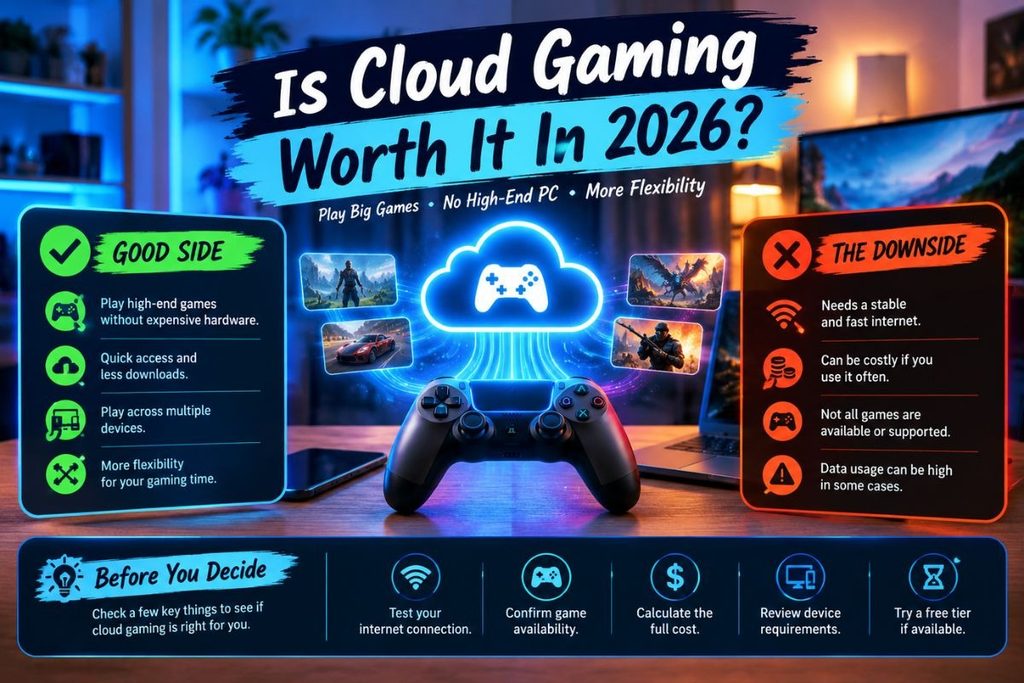
Cloud gaming can be worth considering if you want to play demanding games on a compatible device without investing in a powerful gaming PC. It can also suit people who value quick access, reduced downloads and the flexibility to play across supported devices.
Its value is less certain when internet service is unreliable, data is expensive or the games you want are not included or supported. Subscription costs can also add up if you pay for a service but rarely use it.
Before choosing a platform, test your connection, confirm game availability, calculate the full cost and review the service’s device requirements. A trial or free tier, where available, can help you judge the actual experience before making a longer commitment.
Conclusion
Cloud Gaming provides another way to play by running games on remote servers and streaming them to compatible devices. It can reduce hardware requirements, downloads and storage needs, but it depends on internet quality and service availability.
The right option depends on your connection, budget, preferred games, device compatibility and expectations for responsiveness. Comparing subscription terms, game access and regional support can help you avoid paying for a service that does not meet your needs.
For the best experience, test your network, check supported games and devices and review data usage before subscribing. Cloud gaming can be a practical alternative to local gaming when its convenience outweighs its limitations.
How does cloud gaming work?
Cloud gaming runs a game on a remote server and streams its video and audio to your device. Your controller inputs travel back to the server, where the game processes them and sends updated gameplay to your screen.
What internet speed do I need for cloud gaming?
The required speed depends on the service, resolution and frame rate. Check the provider’s current requirements and make sure your connection is stable, with low latency and minimal congestion, rather than relying on download speed alone.
Can I use cloud gaming without a gaming PC?
Yes, a compatible laptop, smartphone, tablet, TV or other supported device may be enough for some services. You still need suitable software, an eligible account, a reliable internet connection and access to the game you want to play.
Do I own games I play through cloud gaming?
That depends on the service and the game access model. Some services stream supported games you already own, while others offer a subscription catalogue. Streaming access does not automatically mean you own a game or can keep accessing it permanently.
Does cloud gaming use a lot of internet data?
It can, especially when streaming at higher resolutions or frame rates for long sessions. Actual usage varies by service and settings so monitor your connection’s data consumption if your internet plan has a monthly limit.