A gaming computer Intel i5 can be a practical choice for gamers who want a capable processor without moving to a higher tier CPU. However, Core i5 includes different generations and models so the processor name alone does not tell you how well a PC will perform.
The best Intel i5 gaming computer should have balanced hardware. The GPU, RAM, SSD, motherboard, cooling and monitor all contribute to the overall gaming experience.
Whether you are considering a prebuilt gaming PC or planning a custom system, understanding these components can help you choose an i5 gaming desktop that fits your games, resolution and upgrade plans.
What Is a Gaming Computer Intel i5?
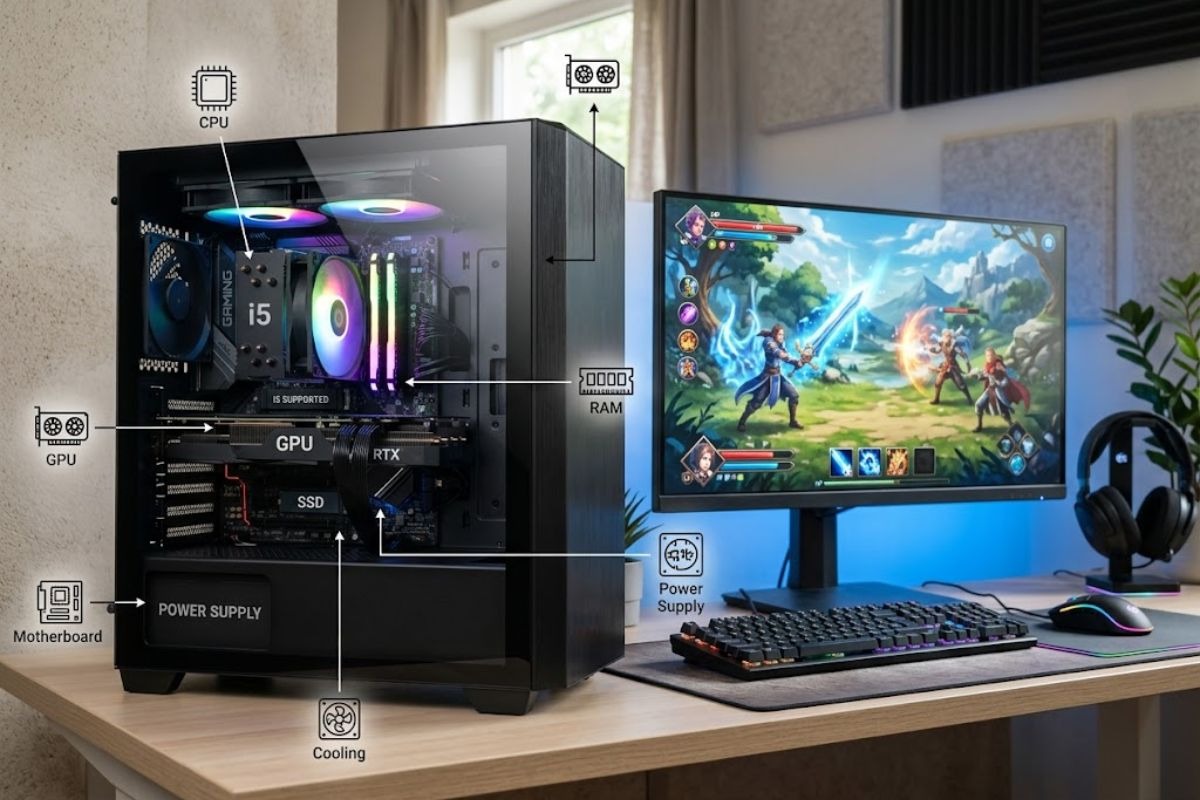
A gaming computer Intel i5 is a desktop computer that uses an Intel Core i5 processor as its CPU. The CPU handles game calculations and general computing tasks, while the GPU handles much of the graphics processing.
An Intel Core i5 gaming PC can use different processor generations and models. As a result, two computers advertised as i5 gaming desktops can have significantly different hardware and performance.
The complete configuration matters more than the processor label. You should check the CPU model, dedicated graphics card, RAM, SSD, motherboard, power supply and cooling before choosing a gaming desktop computer.
Is Intel Core i5 Good for Gaming?
Yes, an Intel Core i5 can be good for gaming when it is paired with suitable hardware. The exact processor model matters because different i5 generations and models have different specifications and capabilities.
The graphics card is equally important for gaming performance. A balanced Core i5 setup combined with a solid GPU easily delivers smooth 60 FPS performance in fast paced competitive titles like Dragon Ball FighterZ at 1080p and 1440p resolutions
An i5 gaming PC can also handle everyday computing, gaming, streaming, recording and other workloads when the complete system has enough CPU, GPU, RAM and storage capacity.
Which Intel i5 Processor Is Best for Gaming?
There is no single i5 processor that is automatically the best choice for every gamer. The right processor depends on the GPU, budget, motherboard, games, resolution and future upgrade plans.
Common options include the Core i5 12400F, Core i5 13400F, Core i5 14400F and Core i5 14600K. These processors belong to different performance levels so they should be evaluated as part of a complete system.
Intel 12th Gen Core i5 processors can still be found in gaming desktops, while Intel 13th Gen Core i5 and Intel 14th Gen Core i5 processors provide newer options.
The Core i5 14400F is one example of an i5 processor that can be paired with a dedicated gaming graphics card. The F suffix indicates that the processor does not include integrated graphics.
The Core i5 14600K is an unlocked desktop processor. Its K designation means it supports overclocking when used with compatible motherboard and cooling hardware.
What Is the Difference Between i5 Generations?
Different Intel Core i5 generations can vary in architecture, core configuration, platform support, memory support and performance. Therefore, the generation number should not be the only factor you consider.
The exact model is important when comparing processors. A Core i5 12400F and a Core i5 14600K, for example, are not simply different versions of the same performance level.
Motherboard compatibility also matters. Moving to a different processor generation may require a compatible motherboard so check platform support before planning a CPU upgrade.
When buying a prebuilt i5 PC, look for the complete processor model rather than relying only on the phrase “Intel Core i5.”
What GPU Should I Pair With an Intel i5?
The GPU is one of the most important components in a gaming computer. It has a major effect on graphics quality, frame rates, resolution and the settings you can use.
A balanced Intel gaming PC should pair the i5 processor with a graphics card that matches your gaming requirements. Spending heavily on the CPU while using an unsuitable GPU can limit overall gaming performance.
For 1080p gaming, an appropriate entry level or mid range dedicated graphics card can be suitable depending on the game and settings.
For 1440p gaming, the GPU becomes more important because the graphics workload increases. For 4K gaming, you generally need a significantly more capable graphics card to handle the higher resolution.
Whether you plan to play demanding AAA titles or popular anime PC games, selecting the right graphics card ensures high frame rates and optimal visual fidelity.
Is RTX 5060 Good With Intel i5?
An RTX 5060 can be paired with an Intel i5 gaming PC, but the complete hardware configuration should be checked before buying.
The combination should be considered according to the exact i5 model, target resolution, games, graphics settings, RAM and desired frame rate.
Instead of choosing a system only because it includes an RTX GPU and an i5 processor, check the exact models and the rest of the configuration.
How Much RAM Does an i5 Gaming PC Need?
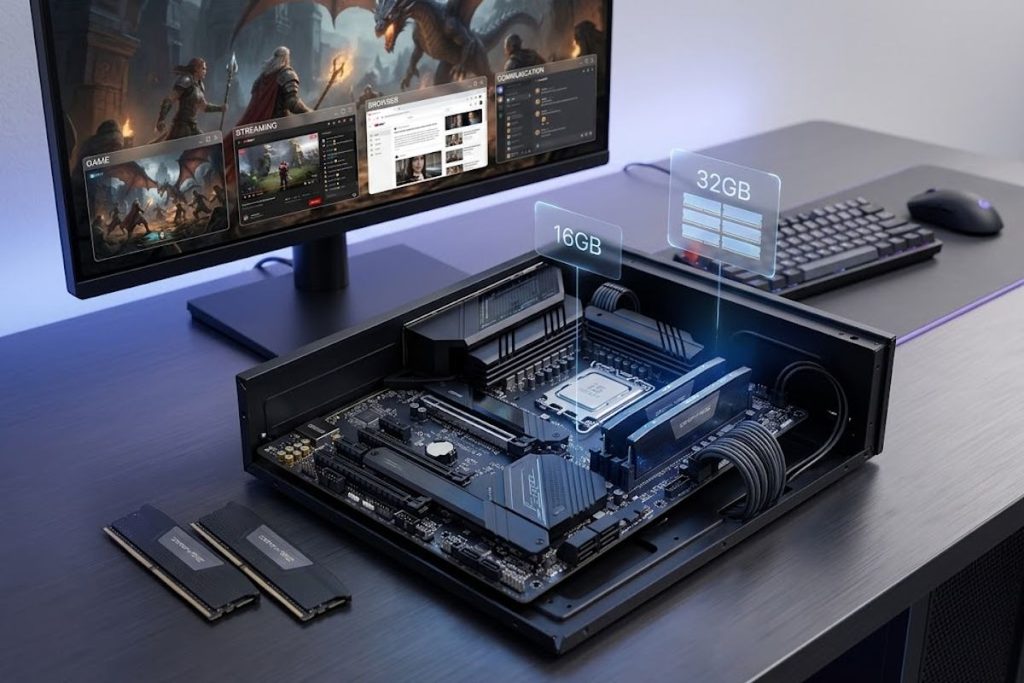
RAM affects how well your gaming computer handles games and other applications at the same time. The amount you need depends on your gaming and multitasking requirements.
A 16GB RAM configuration can be a practical starting point for an i5 gaming PC. It can provide enough memory for many gaming setups without unnecessarily increasing the system cost.
A 32GB RAM configuration provides additional headroom for users who stream, record gameplay, use multiple browser tabs or run communication and other applications while gaming.
You should also check whether the system uses DDR4 memory or DDR5 memory. These memory standards are supported by different platforms so motherboard compatibility is important.
Is DDR4 or DDR5 Better for an i5 Gaming PC?
DDR5 is a newer memory technology, while DDR4 is still used in many desktop systems. The suitable option depends on the processor, motherboard, system price and upgrade plans.
Choosing DDR5 does not automatically make an entire gaming computer better. CPU, GPU, RAM capacity, storage and other components all contribute to gaming performance.
When buying an i5 gaming desktop, confirm that the motherboard supports the selected memory type before making a decision.
How Much SSD Storage Does an i5 Gaming PC Need?
Storage determines how many games, applications and files you can keep installed. Modern gaming desktops commonly use SSD storage for the operating system and applications.
A 512GB SSD can work for users with a smaller game library, but storage can become limited as more large games are installed.A 1TB SSD is a practical option for many gaming computers. It provides room for Windows 11, games, applications and personal files.
A 2TB SSD provides more space for users with larger game libraries. NVMe SSD and M.2 SSD storage are also common in modern gaming desktops.Before buying, check whether the computer supports additional storage. This can make a future storage upgrade easier.
Can an Intel i5 Gaming PC Run 1080p, 1440p and 4K Games?
An Intel i5 gaming computer can be configured for 1080p, 1440p or 4K gaming, but the required hardware changes with the resolution.
1080p places less graphical workload on the GPU, making it a common target for budget and mid range gaming PCs. A suitable i5 processor and dedicated GPU can provide a capable 1080p setup.
1440p requires more graphics processing than 1080p. If you want to play at this resolution, pay particular attention to the GPU rather than choosing a system based only on its CPU.
4K gaming places an even greater workload on the graphics card. A gaming PC intended for 4K should therefore have a sufficiently capable GPU, while the CPU should still be appropriate for the games being played.
Can an i5 Gaming PC Be Used for Streaming?
An Intel i5 gaming computer can be used for gaming, streaming, recording and other content related workloads, depending on the configuration.
Streaming can require the system to run a game, streaming software, browser tabs, communication applications and other programs simultaneously.
A 32GB RAM configuration can provide more multitasking headroom than 16GB when you regularly combine gaming with streaming or recording.
The GPU can also be important because modern graphics cards may support hardware encoding. Streaming users should therefore evaluate both CPU and GPU capabilities.
Prebuilt i5 Gaming PC vs Custom Built PC
A prebuilt gaming PC comes assembled as a complete system. This can make the buying process easier for beginners who do not want to select and install every individual component.
A custom built PC provides more control over the CPU, GPU, RAM, SSD, motherboard, cooling, power supply and case.
A prebuilt i5 gaming PC can be convenient when you want a ready to use computer. A custom system can be useful when you want to select specific components or plan the system around future upgrades.
In either case, compare the complete specifications instead of choosing a computer simply because its product title includes Intel Core i5.
What Should I Look for in an i5 Gaming Computer?
Start with the exact Intel Core i5 processor model. The generation and model number provide more useful information than simply seeing “i5” in a product title.
Next, check the dedicated graphics card and make sure it matches your target resolution and games. The GPU can have a major impact on gaming performance.
Check the RAM capacity and memory type. A 16GB configuration can be suitable for many gaming systems, while 32GB provides additional room for demanding multitasking.
Storage should also be checked carefully. Look for the SSD capacity, such as 1TB or 2TB and check whether it uses NVMe or M.2 storage.
Finally, check Windows 11, Wi Fi, Bluetooth, cooling, power supply, motherboard, available ports and upgrade options. These details help you understand the complete gaming desktop.
Can You Upgrade an Intel i5 Gaming Computer?
Many gaming desktops can be upgraded, but the available options depend on the motherboard, case, power supply, cooling and existing hardware.
RAM and storage are often practical upgrade areas when compatible slots or connections are available. A larger SSD can provide additional space as your game library grows.
A GPU upgrade can improve gaming performance, but the new graphics card must physically fit the case and work with the available power supply.
CPU upgrades require more compatibility checks. The motherboard must support the processor, while BIOS support and cooling requirements may also need consideration.
Before upgrading, check your exact gaming computer specifications instead of assuming that every newer component will be compatible.
What Monitor Should I Use With an i5 Gaming PC?
The monitor should match the performance level of your gaming computer. A more powerful system can make better use of higher resolution or high refresh rate displays.
For 1080p gaming, a high refresh rate monitor can be useful for fast paced games. For 1440p gaming, a 1440p gaming monitor can provide sharper visuals while requiring more GPU performance.
A 4K gaming monitor provides higher resolution, but the gaming computer needs a sufficiently capable GPU to use that resolution effectively.
You should also check monitor connectivity. HDMI and DisplayPort are common connections, while adaptive sync can help provide smoother gameplay when supported by compatible hardware.
What Accessories Do You Need for an i5 Gaming PC?
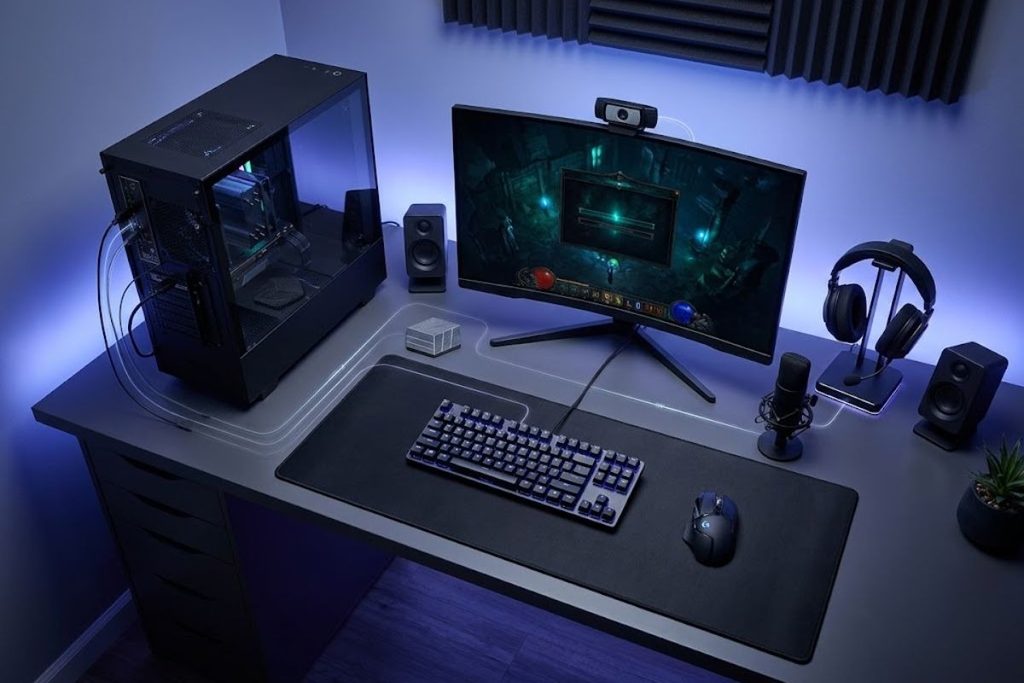
A gaming desktop normally needs a monitor and input devices to create a complete gaming setup. A gaming keyboard and gaming mouse are common starting accessories.
A gaming headset can provide game audio and voice communication for multiplayer games. Depending on your setup, you may also need a microphone, webcam or speakers.
Some gaming computer bundles include accessories, while others contain only the desktop. Check the included items before purchasing.
Conclusion
A gaming computer Intel i5 can provide a capable foundation for gaming when the processor is properly matched with the GPU, RAM, storage and monitor.
The exact i5 model matters because different generations and processors offer different specifications and capabilities. Your choice should also reflect whether you want 1080p, 1440p or 4K gaming.
Whether you choose a prebuilt gaming PC or a custom system, check the complete specifications before buying. A balanced Intel i5 gaming computer can provide a practical gaming setup with room for future upgrades.
FAQs
Is Intel Core i5 good for gaming?
Yes, an Intel Core i5 can be suitable for gaming when paired with an appropriate GPU and other compatible hardware. The exact i5 model should always be checked.
Is 16GB RAM enough for an i5 gaming PC?
16GB RAM can be enough for many gaming setups. Users who regularly stream, record or multitask while gaming may benefit from 32GB RAM.
What GPU should I pair with an Intel i5?
Choose the GPU according to your games, target resolution, graphics settings and desired performance. 1080p, 1440p and 4K gaming can have different GPU requirements.
Is 1TB SSD enough for gaming?
A 1TB SSD can provide practical storage for many gaming computers. Users with larger game libraries may prefer 2TB storage or additional drives.
Is a prebuilt i5 gaming PC worth buying?
A prebuilt i5 gaming PC can be convenient for users who want a ready to use system. Check the CPU, GPU, RAM, SSD, motherboard, power supply, cooling and upgrade options before buying.